databricks
Consuming Databricks on GCP
Databricks service is available as a GCP market place offering and the unit of deployment is called a workspace, from here onwards we’ll be using workspace to refer to databricks service through out this guide.
Databricks is a Managed Service and is fully hosted, managed, and supported by the Databricks. Although you register with the Databricks to use the service, Google handles all billing.
Try Databricks
- Trying databricks in an individual capacity? here’s your 14 days free trial Please note that free trial requires credit card and the trial is converted to a pay-as-you-go subscription after 14 days.
- If your company has a contract subscription in place with GCP, you have two options:
- start the free trial and at the end of trial become a pay-as-you-go customer or end the trial.
- have a need to extend the trial then reach out to your databricks representative or send an email to
sales@databricks.comabout how to create/extend your subscription with a Google Marketplace Private Offer.
- At the end of the trial, you are automatically subscribed to the plan that you have been on during the free trial. You can cancel your subscription at any time.
Trial to Production Journey
stateDiagram-v2
    [*] --> Trial: Sign up for 14-day trial
    Trial --> EvaluatePlan: Day 14 approaching

    EvaluatePlan --> PayAsYouGo: Continue with current plan
    EvaluatePlan --> ExtendTrial: Contact Databricks Sales
    EvaluatePlan --> CancelTrial: End subscription

    ExtendTrial --> PrivateOffer: Negotiate with Databricks
    PrivateOffer --> ContractSubscription: Sign agreement

    PayAsYouGo --> [*]: Active subscription
    ContractSubscription --> [*]: Active subscription
    CancelTrial --> [*]: Subscription ended

    note right of Trial
        Requires credit card
        Full feature access
        14 days free
    end note

    note right of ContractSubscription
        Custom pricing
        Volume discounts
        Enterprise features
    end note
Databricks to GCP mapping
| Databricks | Relationship | GCP |
|---|---|---|
| Account | 1:1 maps to | Billing Account |
| Subscription | maps to | *Entitlements |
| Workspaces | resides in | Consumer Project |
| Worker Environment (**classic dataplane) | maps to | Google Compute Engine based databricks cluster |
| Databricks Serverless | maps to | Serverless compute resources running in the serverless compute plane, which is managed by Databricks |
- *Represents purchase, pricing, and payment mechanism for an account
- **Compute resources resides within your GCP Project and utilizes your own VPC
Architecture Overview
graph TB
    subgraph "GCP Cloud"
        BA[GCP Billing Account]

        subgraph "GCP Organization"
            CP1[Consumer Project 1]
            CP2[Consumer Project 2]

            subgraph CP1
                VPC1[VPC Network]
                WS1[Databricks Workspace 1]
                GCE1[GCE Clusters<br/>Classic Dataplane]
            end

            subgraph CP2
                VPC2[VPC Network]
                WS2[Databricks Workspace 2]
                GCE2[GCE Clusters<br/>Classic Dataplane]
            end
        end
    end

    subgraph "Databricks Control Plane"
        DBA[Databricks Account<br/>1:1 with Billing Account]
        SUB[Subscription/Entitlements<br/>Premium/Enterprise]
        SCP[Serverless Compute Plane<br/>Managed by Databricks]
    end

    BA -.1:1 mapping.-> DBA
    DBA --> SUB
    SUB --> WS1
    SUB --> WS2
    WS1 --> GCE1
    WS2 --> GCE2
    WS1 -.serverless.-> SCP
    WS2 -.serverless.-> SCP

    GCE1 -.resides in.-> VPC1
    GCE2 -.resides in.-> VPC2

    style DBA fill:#1E88E5
    style WS1 fill:#1E88E5
    style WS2 fill:#1E88E5
    style SCP fill:#43A047
    style BA fill:#FF6F00
    style SUB fill:#FDD835
Availability Regions
Please refer to public doc site for supported regions
Things to remember
- Each Databricks account is mapped to one GCP Billing Account (1:1)
- Customer can have more than one account with Databricks
- Subscription is a Databricks concept, it represent various tiers available to our customers.
- Subscription tiers dictates workspace features as well pricing
- Subscription cost does not include cloud resource cost (storage, compute, network)
- Databricks pricing is based on your compute usage called DBU. Storage, networking and related costs will vary depending on the services you choose and your cloud service provider.
- A Databricks Unit (DBU) is a normalized unit of processing power on the Databricks Lakehouse Platform used for measurement and pricing purposes. The number of DBUs a workload consumes is driven by processing metrics, which may include the compute resources used and the amount of data processed.
- Databricks Unit (DBU), which is a unit of processing capability per hour, billed on per-second usage. See pricing for more details.
- Subscription tiers could be upgraded. This applies the upgrade to both current and future workspaces.
- Subscription tier applies at account level so all of the workspace belonging to the account have same features.
Cost Breakdown
graph TB
    TC[Total Cost]

    TC --> DBC[Databricks Cost]
    TC --> GCPC[GCP Cloud Cost]

    DBC --> DBU[DBU Consumption<br/>Based on compute usage]
    DBU --> WL1[Workload Type]
    DBU --> CT[Cluster Type]
    DBU --> RT[Runtime Duration]

    GCPC --> COMP[Compute<br/>GCE Instances]
    GCPC --> STOR[Storage<br/>GCS Buckets]
    GCPC --> NET[Networking<br/>Egress/VPC]
    GCPC --> OTHER[Other Services<br/>BigQuery, etc.]

    style TC fill:#FF6F00
    style DBC fill:#1E88E5
    style GCPC fill:#4285F4
    style DBU fill:#FDD835
Subscription Tiers
graph LR
    subgraph Subscription Tiers
        STANDARD[Standard Tier<br/>Basic Features]
        PREMIUM[Premium Tier<br/>+ Security Features<br/>+ Customer Managed VPC<br/>+ IP Access Lists]
        ENTERPRISE[Enterprise Tier<br/>+ Advanced Security<br/>+ Unity Catalog<br/>+ Compliance Features]
    end

    STANDARD -->|Upgrade| PREMIUM
    PREMIUM -->|Upgrade| ENTERPRISE

    STANDARD -.applies to.-> WS1[All Workspaces]
    PREMIUM -.applies to.-> WS1
    ENTERPRISE -.applies to.-> WS1

    style STANDARD fill:#90CAF9
    style PREMIUM fill:#1E88E5
    style ENTERPRISE fill:#0D47A1
    style WS1 fill:#FDD835
Recommendations
- Read thru pricing and subscription tiers details before your begin.
Premiumtier includes security features like Customer Managed VPC and IP Access List which are are a must have for most of the enterprises and thats what rest of the docs are going to refer to.- Take advantage of free training to familiarize yourself with the offering.
- Upon subscribing to Databricks on GCP, make sure to add atleast one more user to the account console and make them accounts admin, typicaly someone who’s going to manage Databricks, this way we won’t need the
billingadmin to create workspaces later on. - Review and Increase GCP resource quota appropiately.
- Configure audit log delivery, this is an account level feature.
- Configure domain name firewall rules.
Initial Setup Sequence
sequenceDiagram
    actor Admin as Billing Admin
    participant GMP as GCP Marketplace
    participant DBA as Databricks Account Console
    participant GCP as GCP Project

    Admin->>GMP: Subscribe to Databricks
    GMP->>DBA: Create Databricks Account<br/>(1:1 with GCP Billing Account)
    Admin->>DBA: Login to accounts.gcp.databricks.com

    Note over Admin,DBA: Initial Account Configuration

    Admin->>DBA: Add Account Admins
    Admin->>DBA: Configure Audit Log Delivery
    Admin->>DBA: Configure Firewall Rules

    Note over Admin,GCP: Prepare GCP Environment

    Admin->>GCP: Review & Increase Resource Quotas
    Admin->>GCP: Create Consumer Project(s)
    Admin->>GCP: Setup VPC Network(s)
    Admin->>GCP: Configure IAM Permissions

    Note over Admin,DBA: Ready to Create Workspaces

    Admin->>DBA: Create Workspace(s)
    DBA->>GCP: Deploy Workspace in Consumer Project
Workspace Deployment Considerations
Workspace deployment is influenced by your organization structure on GCP. Workspace is created within your GCP project utilizing your VPC so there are several options available to us. Taking a cue from the GCP recommendations on resource hierarchy
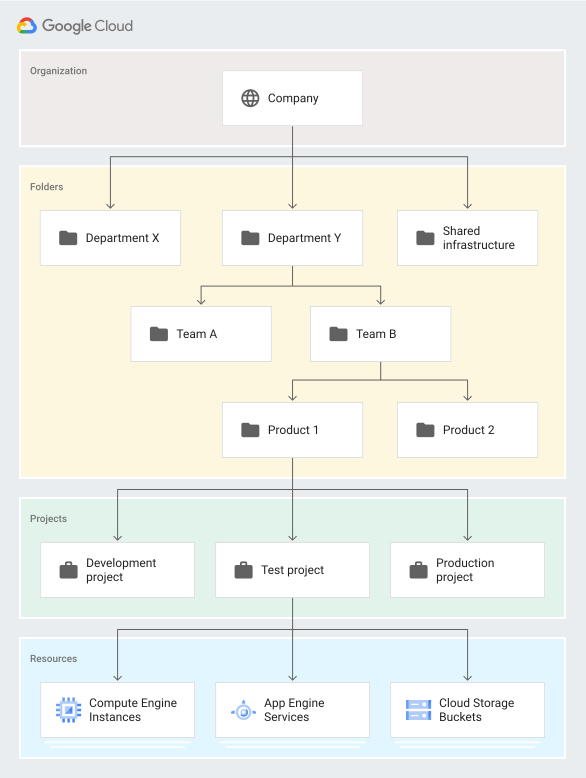
here we share few options
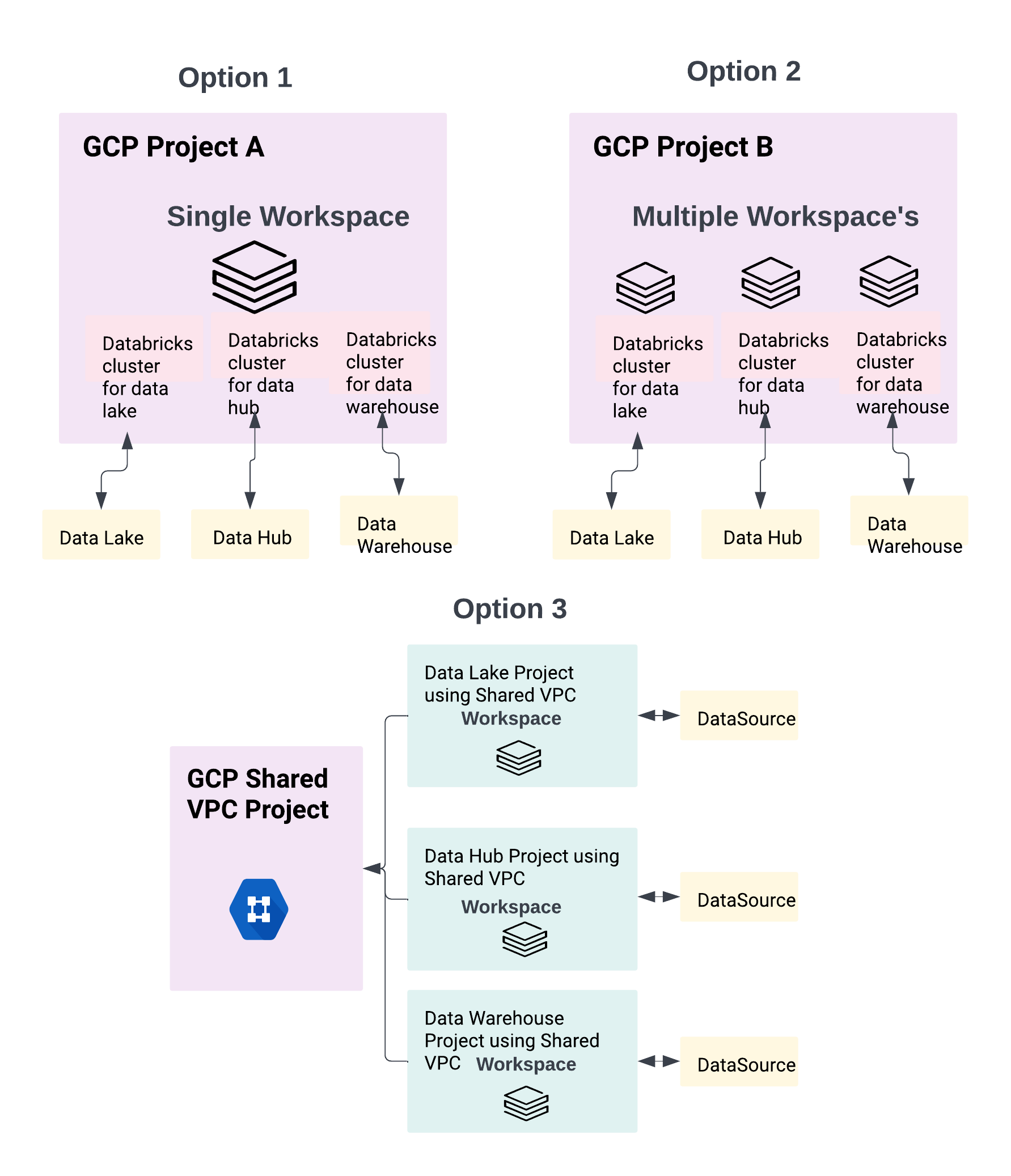
Deployment Options Overview
graph TB
    subgraph "Option 1: Dedicated Project + Dedicated VPC"
        O1P1[GCP Project 1]
        O1V1[VPC 1]
        O1W1[Workspace 1]

        O1P2[GCP Project 2]
        O1V2[VPC 2]
        O1W2[Workspace 2]

        O1P1 --> O1V1 --> O1W1
        O1P2 --> O1V2 --> O1W2
    end

    subgraph "Option 2: Shared Project + Shared VPC"
        O2P[GCP Project]
        O2V[Shared VPC]
        O2W1[Workspace 1]
        O2W2[Workspace 2]
        O2W3[Workspace 3]

        O2P --> O2V
        O2V --> O2W1
        O2V --> O2W2
        O2V --> O2W3
    end

    subgraph "Option 3: Separate Projects + Shared VPC Host"
        O3HP[Host Project<br/>Shared VPC]
        O3SV[Shared VPC Network]

        O3SP1[Service Project 1<br/>Workspace 1]
        O3SP2[Service Project 2<br/>Workspace 2]
        O3SP3[Service Project 3<br/>Workspace 3]

        O3HP --> O3SV
        O3SV -.attached.-> O3SP1
        O3SV -.attached.-> O3SP2
        O3SV -.attached.-> O3SP3
    end

    style O1P1 fill:#4285F4
    style O1P2 fill:#4285F4
    style O2P fill:#4285F4
    style O3HP fill:#EA4335
    style O3SP1 fill:#4285F4
    style O3SP2 fill:#4285F4
    style O3SP3 fill:#4285F4
- Option 1:
- 1:1 mapping between workspace to GCP Project
- 1:1 mapping between workspace to GCP VPC i.e. dedicated VPC for workspace
- VPC and Workspace reside in the same GCP Project
- Use Case: Maximum isolation, separate billing, independent lifecycle management
- Option 2:
- M:1 mapping between workspaces tp GCP Project i.e. Multiple workspaces in a single Project
- M:1 mapping between workspaces to VPC i.e. multiple workspaces to share a single VPC
- VPC could be a Shared VPC or a non Shared VPC
- VPC and Workspace reside in the same GCP Project
- Use Case: Cost optimization, simplified networking, team/department consolidation
- Option 3:
- 1:1 mapping between workspaces tp GCP Project
- M:1 mapping between workspaces to VPC i.e. multiple workspaces using a single Shared VPC
- VPC and Workspace reside in different GCP Project
- Use Case: Centralized network management, security compliance, multi-project organizations
Workspace Creation Flow
sequenceDiagram
    actor Admin as Account Admin
    participant DBA as Databricks Account
    participant GCP as GCP Project
    participant VPC as VPC Network
    participant CP as Control Plane
    participant DP as Data Plane

    Admin->>DBA: Create Workspace Request
    DBA->>GCP: Validate Project Access
    GCP-->>DBA: Project Confirmed

    DBA->>VPC: Validate VPC Configuration
    VPC-->>DBA: VPC Confirmed

    DBA->>CP: Provision Control Plane Resources
    activate CP
    CP-->>DBA: Control Plane Ready
    deactivate CP

    DBA->>DP: Initialize Data Plane in GCP Project
    activate DP
    DP->>GCP: Create Service Account
    DP->>VPC: Configure Subnets & Firewall Rules
    DP-->>DBA: Data Plane Ready
    deactivate DP

    DBA-->>Admin: Workspace URL

    Note over Admin,DP: Workspace is now operational

    Admin->>DBA: Access Workspace
    DBA->>CP: Authenticate User
    CP->>DP: Authorize Cluster Creation
    DP->>GCP: Launch GCE Instances
    GCP-->>Admin: Cluster Running in VPC
We revisit this topic in detail along with VPC and IAM permissions requirements, sizing and automation options in Workspace Provisioning section